Design-led experimentation for SME HR systems
Over 50% of SMEs face HR system issues.
Over 30% of SME executives are concerned about HR management. Many SMEs still rely on basic tools—36% lack proper HR technology, and 34% have experienced payroll errors. Nearly half of employees report unprofessional HR structures (47%) and low trust in their HR teams (43%).

SJ
HR system for small business
Introduction
Sajang is an HR system tailored for SMEs, offering flexible pricing. Core features are integrated directly, allowing for cost-effective customization.
Responsibilities
-
Designed a custom HR system for small businesses
-
Conducted stakeholder interviews to define needs
-
Created personas and user flows
-
Delivered high-fidelity prototypes
-
Simplified analog workflows into digital experiences
Duration
5 week
Team
Solo
Role
User Research
User Testing
UI Design
Branding
Breaking the echo chamber with brainstorming

Through brainstorming, I asked myself: “Does an HR system really need to be complex?”
Most small business owners juggle both operations and HR, and what they value most is efficiency and clarity.
This led me to simplify the design, focusing on a wireframe that highlights what matters most: attendance, schedules, and payroll.
Problem
Due to the high cost and complexity of existing software, small and medium-sized enterprises (SMEs) often rely on traditional paper-based systems, creating inefficiencies in task allocation and salary management
This results in significant challenges
-
Pain point 1
High cost of office supplies
-
$77–$92 spent per employee each month
-
No digital system → repeated waste & cost

-
Pain point 2
Poor task distribution
-
Unclear roles → team conflict, blame-shifting
-
Weak HR structure → low retention
-
Gen Z quits within ~3 years

-
Pain point 3
Paper-based process = confusion
-
Printed contracts & schedules
-
Missing info, human errors
-
Lost docs → trust & workflow decline
Target audience
"SME owners often assign tasks based on memory or gut feeling."
Small business owners

They need only the essential HR functions—simple, efficient, and flexible. My system is tailored to their operations, helping them save time and reduce confusion. Through user testing and interviews, I refine the features to fit real business contexts.

User’s perspective
Users typically check their schedules first thing in the morning or review project updates even while on business trips. For this, accurate and intuitive design is essential.
Efficient
Users can check the features they selected and view their daily schedule, projects, and employee status all at once.
Accurate
Users can utilize feedback to determine the direction of their brand and assign appropriate tasks to each team member.
SJ user flow
Deeper insight
Based on research, I visualized the emotions, behaviors, and goals that users may experience at each stage of app usage

Market trend research
Among competitors, I investigated key functions useful to small and medium-sized businesses and investigated whether they could be used comprehensively

Brand Positioning

1. Targeted at business owners.
2. Focused on core HR systems.
I look at the company's operations through the eyes of a CEO or manager, where results and work status are more important than tracking file exchanges. They only need core functions that are relevant to their business.

4.0
Managers
Employees
3.5
CEO
3.6
Deeper insight
SJ user interview
Based on interviews with persona-selected small business owners or manager-level administrators, I identified and addressed the design issues.

“We need to reduce discord among employees."
YSL
"An HR app for small businesses should be designed from the perspective of managers and owners."
Jun Y
"It would be great to have a real-time overview of employees' project statuses at a glance."
LKJ
Sang H
"It would be helpful if team members could see the projects they've worked on."
Kevin
"Subjective evaluations can be biased, so caution is needed. An alternative is necessary."
Revision .1
Granular features
Before

After

What improved
1 . Add template search function
Each company can search for and purchase only the HR system templates they need. Small businesses don't require many features.
2 . Auto-configure services by business type
Companies can purchase a plan automatically tailored to their business type. Different colors have been added for each business type to avoid any confusion between plans.
2-1 . Add Plan detail
Users can remove or add systems while configuring their plan
Revision .2
Intuitive & Functional
Before

After

What improved
1 . Add todo list function
I placed today's tasks at the top and arranged upcoming deadlines in order of importance.
2 . Discerning design
I refined the wireframes, clearly separating client and internal meetings. I also color-coded staff attendance and status for clarity.
Revision .3
Schedule overview
Before
After

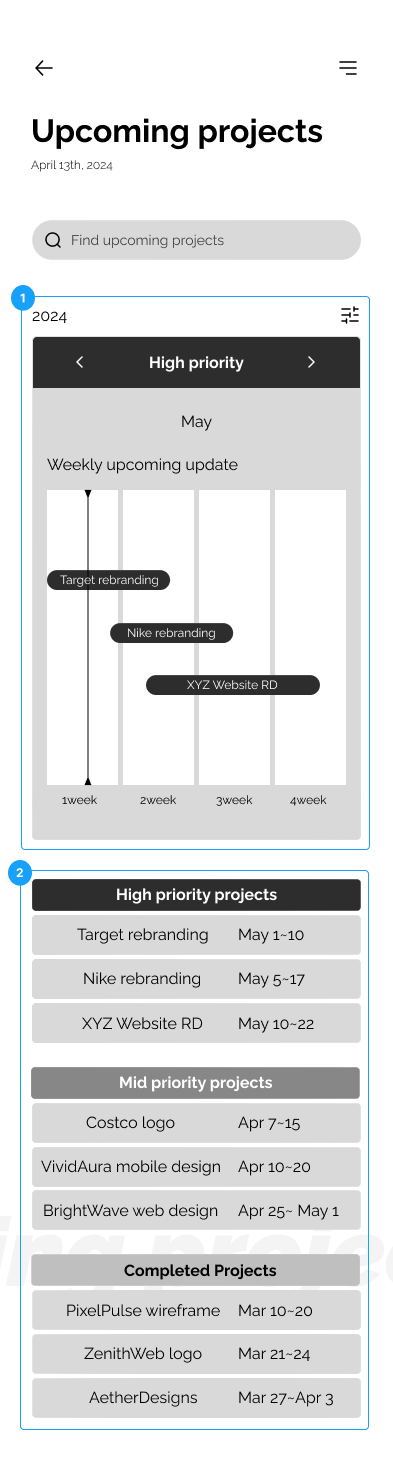
What improved
1 . Add container
A clickable container was added, allowing users to view the project details upon clicking.
2 . Seperated wireframe
The system was adjusted to display project deadlines by day, week, and month, making it easier to track automatically.
Color differentiation was enhanced to clearly indicate project priorities.
Solution
-
Solution 1
Digital system transition

-
Customized HR systems tailored to each brand
-
Reduced office supply consumption
-
Solution 2
Appropriate work assignment

-
Tasks reassigned based on analysis of individuals, peers, and supervisors
-
Performance feedback supports employee growth
-
Solution 3
Document templating system

-
Company-specific templates enable quick, at-a-glance views
-
Visual task summaries (e.g. handovers, interview scheduling) save time and improve clarity

Process flow
Boosting appropriate information
Owners or managers want to select systems that fit their business.
Therefore, they can remove any systems they don’t need.
SOLUTIONS ON PAIN POINT 1
Adjusted plan
Focused on core HR function
A simple and well-structured wireframe
At the start of the day, they want to check tasks for the day, meetings, project status, and employee status in that order.
To do list
SOLUTIONS ON PAIN POINT 2
Objective and well-rounded feedback
Team performance analysis
Easily identify the team's strengths and weaknesses
Users can see the team's overall and individual strengths and weaknesses, allowing for optimal project assignments.
Self performance feedback
Easily identify individual challenges in a project.
Users can identify issues through each member's self evaluation and find solution thorough real-time chat and 1:1 meetings.
Peers feedback
Evaluate team members' abilities through diverse judgments from peers and managers, and track growth or decline through accumulated records over time.
Track individual growth through evaluations
SOLUTIONS ON PAIN POINT 3
Current project status and Detail
A layout that displays deadlines and priorities at a glance.
Users can visually check the deadlines of group projects in order of priority.
Detail : Users can see project details, team performance metrics, and the team's budget usage.
Project history & analyzing
Track individual growth through evaluations
Review project records to see what improved or declined in the project's outcomes.
And clicking on a project will list similar projects in order of relevance.
Additional Screen
Employees information
View department-wise employee count, status, gender ratio, and employee details.
Add departments and input new hires during business expansion. Useful for business expansion.
Employees
Information
Attendance and analysis
Monitor employee attendance, vacations, overtime, and resignations, while visually representing key metrics such as attendance rates, lateness, resignations, and overtime.
Attendance
Impact & Expectation
1. Schedule
Before
Time wasted on manual input
Frequent attendance errors
Overlapping or missed schedules
After
Automated scheduling saves 30% of time
Smart system reduces errors by 25%
Clear view improves efficiency by 20%
2. Allocation
Before
Workload concentrated on few people
Unclear roles caused confusion
Project delays
After
Automated distribution boosts 35% balance
Clear roles raise job satisfaction by 20%
Better resource use shortens time by 15%
3. Direction
Before
Scattered task instructions
Vague goals
Low engagement
After
Centralized flow cuts communication errors by 40%
Clear tasks improve goal completion by 25%
Structured feedback boosts engagement by 30%
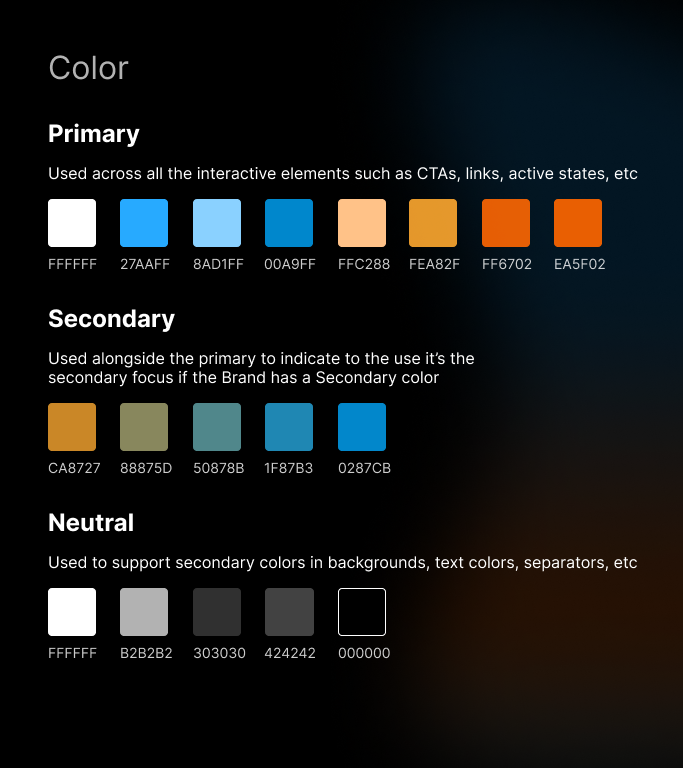
Design system


Reflection & Next step
👍 Do
Prioritizing user context over "industry best practices"
I design based on real users—like small business owners or non-technical individuals—rather than default UX patterns.
Ex: A simple “Today’s Tasks” view often works better than a complex dashboard.
Validating flows with low-fidelity sketches
Before opening Figma, I sketch flows on paper to test logic quickly.
This helps catch prioritization and flow issues early.
Simplifying flows for clarity and speed
I reduce clicks and minimize screen content for faster decision-making.
Ex: I streamlined an employee registration form by removing extra fields and using smart defaults.
☠️ Don't
Avoiding feature creep that dilutes core value
I aim to stay focused on user-centered design instead of chasing short-term satisfaction or client-driven additions that disrupt the core experience.
Not designing without considering user effort
Rather than adding more features, I prioritize how quickly and clearly users can understand and interact with the product.


To be continue

Feel Free to reach me!
Maxxie
Navigation
Home
About
Contact
Social
Linkedin
Instagram
Youtube
Contact
maxxi3lee@gmail.com
Tel. none
NY, Queens
© 2024 by Maxxie Lee